Android APK Reverse Engineering — A Practical Guide
Full walkthrough from APK extraction to patching, including integrity check bypass and Frida-based permanent patching
Tools
- AntiSplit-M — merging split APKs
- Ghidra — reverse engineering native libs
- Objection — easy Frida patching
- Frida — dynamic instrumentation
- JADX — Java decompilation
- ByteCodeViewer — alternative decompiler
Guide
Preparing the App
Using AntiSplit-M:
- Download and install AntiSplit-M from GitHub
- Click ‘Select from Installed Apps’
- Select the app from the list
- Save to default location (/sdcard)
- Connect device to adb
- Run:
 Bash
Bash adb pull /sdcard/apkname_antisplit.apkDirect from Android package manager:
- List packages: Bash
adb shell pm list packages - Identify the package name
- Get path: Bash
adb shell pm path com.example.packagenamehere - Pull APKs: Bash
adb pull (path) - If split APK, merge with AntiSplit-M
Downloading from the internet:
- Search for the APK
- Choose reliable source (APKMirror, APKPure, F-Droid)
- Download APK/APKS/XAPK
- If split, merge with AntiSplit-M
Bypassing Integrity Protections
After installing the unmodified but merged APK, the app crashed quickly due to signature changing. Logcat showed an error from native function verifyNativeIntegrity called from function x1.
Using JADX: search for the function definition, find the class, look for System.LoadLibrary to identify which native library to investigate.
Extract the library from libs folder in JADX, open in Ghidra or IDA. Look for functions beginning with Java_ (JNI callable methods). In this case, verifyNativeIntegrity returns a boolean — patching means forcing return value to true.
Two approaches: patching the library with Ghidra, or patching with Frida.
Frida approach:
Create frida-gadget.config:
 JSON
JSON {
"interaction": {
"type": "listen",
"address": "127.0.0.1",
"port": 27042,
"on_port_conflict": "fail",
"on_load": "wait"
}
}Create frida.js to patch the native function:
Java.perform(function () {
    let Log = Java.use("android.util.Log");
    Log.d("Frida", "Frida script loaded");
    Interceptor.attach(Module.getExportByName('libnativelibrary.so', 'Java_com_example_verifyNativeIntegrity'), {
        onEnter: function (args) {
        },
        onLeave: function (retval) {
            Log.d("Frida", "verifyNativeIntegrity was called");
            let result = retval.toInt32();
            Log.d("Frida", "verifyNativeIntegrity result=" + result + " forced to 1");
            retval.replace(1);
        }
    });
});
Patch the APK:
Bash objection patchapk -2 -c frida-gadget.config -l frida.js -s apkname_antisplit.apkThen run:
Bash frida -l frida.js -U GadgetThe app still closed but with “System.exit called” — more integrity checks. Search for System.exit in JADX — it’s called in 5 places. Hook it with Frida:



let exit = Java.use("java.lang.System").exit;
let Exception = Java.use('java.lang.Exception');

exit.implementation = function (code) {
    Log.d("frida", "System.exit is called with code=" + code);
    let currentException = Exception.$new();
    Log.d("frida", "Called from: " + currentException.getStackTrace()[1]);
    if (code == 0) {
        Log.d("frida", "System.exit bypassed");
        return;
    }
    this.exit(code);
};
This reveals the calling function. Navigate to it in JADX.
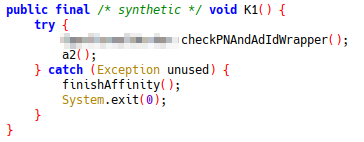
Note: checkPNAndAdIdWrapper has been renamed in JADX to make decompilation easier. It is good practice to do similar if you can work out the purpose of any methods.
The function checkPNAndAdIdWrapper calls several integrity checks — signature checking, package name checks, etc.
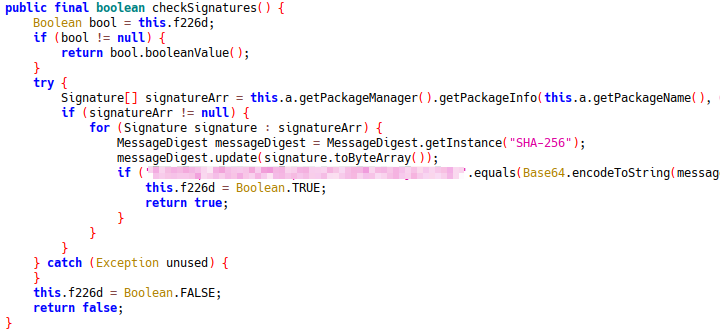
Since these all go through K1, patch K1:
let exampleActivity = Java.use("com.example.activity");
exampleActivity["K1"].implementation = function () {
    console.log("com.example.activity.K1 was called");
    // this["K1"](); // COMMENT OUT TO DISABLE
};
Killing RootBeerFresh (Root Detection)
JADX shows com.kimchangyoun.rootbeerFresh package.
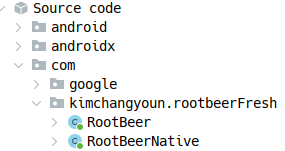

RootBeer methods called in a single function that returns false if no triggers hit. Patch it:
let rc = Java.use("rc");
rc["l"].implementation = function (context) {
    return false;
};
Permanently Patching the App
Once all patches work, make the Frida script run automatically. Edit frida-gadget.config:
JSON {
"interaction": {
"type": "script",
"path": "libfrida-gadget.script.so"
}
}Rebuild and patch with Objection:
Bash objection patchapk -2 -c frida-gadget.config -l frida.js -s apkname_antisplit.apk