Tools
- AntiSplit-M GitHub (For merging split apks and extracting apks from device)
- Ghidra GitHub (For reverse engineering native libraries)
- Objection GitHub (For quick easy frida patching)
- Frida Website (For dynamic instrumentation)
- JADX GitHub (For Java decompilation) / ByteCodeViewer GitHub (Alternative option for Java decompilation - support multiple decompilers)
Guide
- Preparing the app
- Download and install AntiSplit-M from GitHub (link above)
- Click 'Select from Installed Apps'
- Select the app from the list
- Save to default location (/sdcard)
- Connect device to adb
- Run `adb pull /sdcard/apkname_antisplit.apk`
- List packages with `adb shell pm list packages`
- Identify the package name of the app
- Get its path with `adb shell pm path com.example.packagenamehere`
- Pull all listed apks with `adb pull (path)` Note: you may have a single apk, or it may be multiple depending on whether the app is a split app
- If the app is a split app, merge the apks together with AntiSplit-M or other tool
- Search `(app name) apk`
- Choose a reliable source (apkmirror.com, apkpure.com, f-droid etc)
- Download the apk / apks / xapk
- If apks/xapk or other split apk, merge using AntiSplit-M
- Bypassing integrity protections
After installing the merged apk back to my device, it would crash very quickly, hinting at an error or some integrity checks.
Opening the logcat window in Android Studio and filtering to the package name showed the app was crashing due to an error from a native function 'verifyNativeIntegrity' called from the function 'x1'.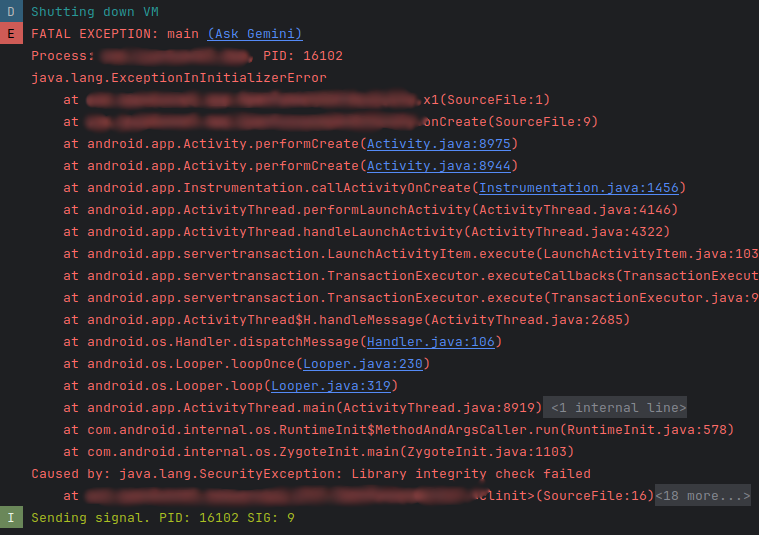
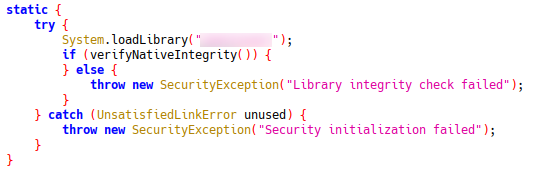
Loading the apk into JADX, I found the function definition using search, and found the class it's called in. Looking inside the class you will see a 'System.LoadLibrary' call, showing you which library to investigate.
To further investigate 'verifyNativeIntegrity', extract the library from the libs folder in JADX, and open in Ghidra or IDA. Open the functions dropdown and look for functions beginning with 'Java_'. These are the native methods which are callable from the Java code using JNI.
Ghidra will provide a pseudocode representation of the function for you, however, you may be able to ignore this if the code is basic enough. In my case, verifyNativeIntegrity returns a boolean, so for patching it will be as simple as setting the return value to true.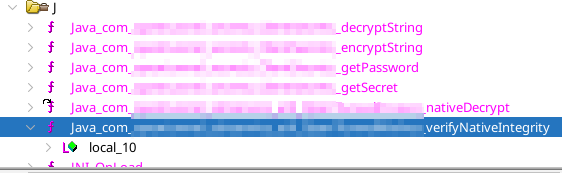
For patching there are 2 main options:
- Patching the library using Ghidra
- Patching the app implementation using frida
To patch with frida, we will be writing a frida script for all patches and injecting this along with the frida gadget and the gadget config.
First, create the 'frida-gadget.config' file and insert the following{ "interaction": { "type": "listen", "address": "127.0.0.1", "port": 27042, "on_port_conflict": "fail", "on_load": "wait" } }Next, create the 'frida.js' file and use the following template to patch the native function
Java.perform(function () {
    let Log = Java.use("android.util.Log");
    Log.d("Frida", "Frida script loaded");
    Interceptor.attach(Module.getExportByName('libnativelibrary.so', 'Java_com_example_verifyNativeIntegrity'), {
        onEnter: function (args) {
        },
        onLeave: function (retval) {
            Log.d("Frida", `verifyNativeIntegrity was called`);
            let result = retval.toInt32();
            Log.d("Frida", `verifyNativeIntegrity result=${result} forced to 1`);
            retval.replace(1);
        }
    });
});
Next, run
objection patchapk -2 -c frida-gadget.config -l frida.js -s apkname_antisplit.apk
to patch the antisplit apk with the frida gadget.
After this, open the app on the device and execute 'frida -l frida.js -U Gadget', while monitoring the logs in Android Studio.
Unfortunately, the app still closed, however, now with no error just the message 'System.exit called'.
This likely means the app has more integrity checks, which are being triggered and closing the app.
Using JADX, search for 'System.exit'. this shows that System.exit is called in 5 places, but we don't know which is triggering the close.
By hooking 'System.exit' with frida using the code below, and then restarting the app and once again running 'frida -l frida.js -U Gadget'let exit = Java.use("java.lang.System").exit; let Exception = Java.use('java.lang.Exception'); exit.implementation = function (code) { Log.d("frida", `System.exit is called with code=${code}`); let currentException = Exception.$new(); Log.d("frida", `Called from: ${currentException.getStackTrace()[1]}`); if (code == 0) { Log.d("frida", `System.exit bypassed`); return; } this.exit(code); };we can view which function is calling exit.

Then we can navigate to this function in JADX to work out why it was called.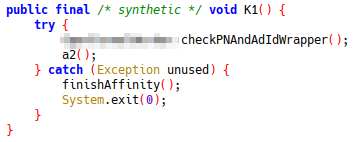
Note: checkPNAndAdIdWrapper has been renamed in JADX to make decompilation easier. It is good practice to do similar if you can work out the purpose of any methods.
checkPNAndAdIdWrapper calls several functions including the one below for signature checking, one for checking the package name and more integrity checks
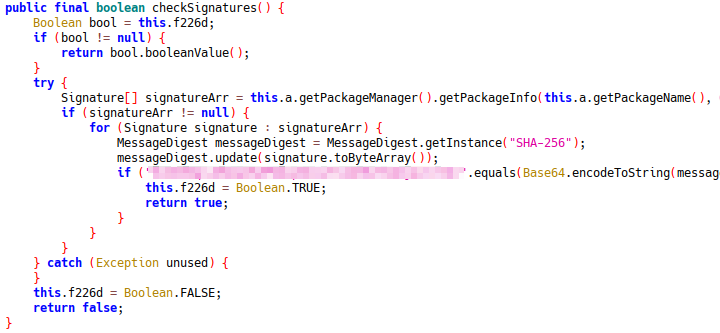
As all of these are being called by K1, and K1 has no other functionality, patching out these checks can be easily done by replacing K1's implementation to disable its functionality completely.
First right click the function's definition and copy as frida snippet. Then edit the frida snippet to remove the original function call. Like this:let exampleActivity = Java.use("com.example.activity"); exampleActivity["K1"].implementation = function () { console.log(`com.example.activity.K1 was called`); // this["K1"](); // REMOVE THIS LINE OR COMMENT IT OUT LIKE THIS };After adding this snippet to the frida.js file, restart the app again and rerun frida. You should now see this check has also been bypassed. If more checks are present, repeat the steps adding to the frida.js file until all methods have been patched.
- Killing RootBeerFresh (Root and device modification detections)
With the apk open in JADX, I noticed the `com.kimchangyoun.rootbeerFresh` package.
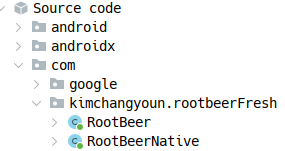

Searching for `RootBeer` in JADX showed that the methods were only called in one single function which returned false if no triggers where hit.
Patching this is very easy, simply copy as frida snippet and replace the return value to always be false.let rc = Java.use("rc"); // Where rc is the class containing function l where l is the function calling RootBeer rc["l"].implementation = function (context) { return false; };Then rerun the app and execute frida again
- Permanently Patching The App
Once you have implemented all the patches into frida.js, it's time to make the frida script run automatically, without the need for adb and another device.
To do this, we will edit the frida-gadget.config like so:{ "interaction": { "type": "script", "path": "libfrida-gadget.script.so" } }Then rebuild and patch the apk with objection, this time passing the frida.js script to be included within the apk.
objection patchapk -2 -c frida-gadget.config -l frida.js -s apkname_antisplit.apk